
How to Ask Customers for Google Reviews Without Sounding Pushy
- Review Buddy
Summary
Asking customers for Google reviews works best when the request is simple, timely, personal, and compliant with Google’s review policies. The biggest mistake businesses make is either not asking at all or asking in a way that feels awkward, generic, or forced.
Google reviews matter because they help customers decide whether to trust a local business. BrightLocal’s 2026 Local Consumer Review Survey found that 41% of consumers always read reviews when browsing for businesses, up from 29% the year before. It also reported that 71% of consumers use Google to read local business reviews.
Key takeaways
- The best time to ask for a Google review is shortly after a positive customer experience.
- The request should feel personal, not automated or desperate.
- Do not offer discounts, gifts, or rewards in exchange for reviews.
- Ask all eligible customers, not only the happy ones.
- Make the review process easy by sending a direct Google review link.
- Follow up once, but do not pressure the customer.
- A consistent review system beats random manual asking.
Why Google Reviews Matter for Local Businesses
Google reviews are one of the first trust signals customers see when they search for a local business.
Before someone calls a clinic, books a service, orders food, or chooses a contractor, they usually check three things: star rating, review count, and recent customer feedback. If your business has fewer reviews than competitors, customers may assume your business is less trusted, even if your service is better.
Google reviews influence trust before the customer ever visits your website.
For local businesses, reviews also support visibility in Google Search and Google Maps. Google has said that review count and review score can factor into local ranking, especially when they show that a business is trusted and relevant to the searcher.
This is why asking for reviews should not be treated as a random favour. It should be part of your customer journey.
The problem is that most businesses do not have a system. Staff forget to ask. Customers forget to leave the review. Follow-ups feel awkward. The result is simple: happy customers leave quietly, while unhappy customers are often more motivated to write something.
That is a bad reputation strategy.
Why Customers Do Not Leave Google Reviews
Most happy customers are not against leaving a review. They just do not think about it.
A satisfied customer may leave your business feeling good, but five minutes later they are back to their normal life. They get in the car, check messages, go back to work, pick up kids, or move to the next task. Your review request is not on their mind.
This is why timing matters.
Customers are most likely to leave a review when the experience is still fresh and the request is easy to complete.
Businesses usually lose reviews for four reasons:
- They do not ask.
- They ask too late.
- They make the process complicated.
- They send a generic request that feels robotic.
A message like “Please leave us a review” is better than nothing, but it is weak. It gives the customer no emotional reason to act.
A better request makes the customer feel recognized.
Is It Okay to Ask Customers for Google Reviews?
Yes, businesses can ask customers for Google reviews. But the way you ask matters.
Google’s Business Profile Help Center encourages businesses to manage and respond to customer reviews, and Google provides tools for businesses to share review links with customers.
However, Google does not allow fake engagement. Google defines fake engagement as content that does not represent a genuine experience.
That means your review request must be honest. You should not:
- Buy fake reviews.
- Offer discounts or rewards for reviews.
- Ask people who never used your business.
- Pressure customers to leave only positive reviews.
- Filter unhappy customers away from Google.
- Tell customers exactly what to write.
The FTC also finalized a rule in 2024 banning fake reviews and testimonials, including buying or selling fake consumer reviews.
The safest review strategy is simple: ask real customers for honest feedback after a real experience.
The Best Time to Ask Customers for a Google Review
The best time to ask is shortly after the customer has had a positive experience.
For service businesses, this could be:
- After an appointment.
- After a successful delivery.
- After a meal.
- After a completed repair.
- After a treatment.
- After a customer compliments your staff.
- After a customer says they are happy with the result.
The timing depends on your business, but the rule is the same: ask while the experience is still fresh.
For example:
| Business Type | Best Time to Ask |
|---|---|
| Clinic | 1 to 3 hours after appointment |
| Restaurant | 30 minutes to 2 hours after visit |
| Salon or spa | Same day after service |
| Contractor | After job completion |
| Auto repair shop | After pickup |
| Fitness studio | After a positive class or milestone |
Do not wait a week unless your service requires time for results. The longer you wait, the more the emotional connection fades.
The Best Way to Ask for a Google Review
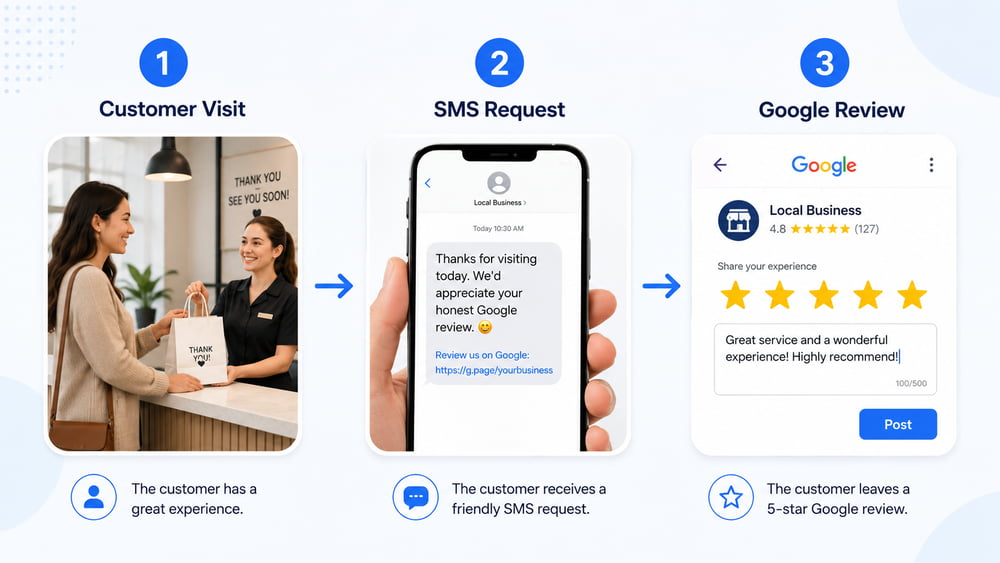
The best way to ask for a Google review is to make the request personal, short, and easy.
A strong review request has five parts:
- Customer name.
- Reference to the real experience.
- A sincere thank-you.
- A clear review request.
- A direct Google review link.
Here is the basic structure:
Hi [Customer Name], thank you for visiting [Business Name] today. We’re glad we could help. If you have a minute, would you mind sharing your experience on Google? It helps other local customers find us. [Review Link]
This works because it is clear and respectful. It does not beg. It does not pressure. It gives the customer a reason.
The best Google review requests do not ask for a favour. They remind customers that their feedback helps other people make better decisions.
Google Review Request Templates
Use these templates as starting points. Adjust them to match your business.
Simple Google Review Request
Hi [Customer Name], thank you for choosing [Business Name]. If you had a good experience, would you mind leaving us a quick Google review? It helps other local customers find us.
[Google Review Link]
Personal Service Business Template
Hi [Customer Name], it was great seeing you at [Business Name] today. We appreciate you trusting us. If you have a minute, we’d really appreciate your honest feedback on Google.
[Google Review Link]
Restaurant Review Request
Hi [Customer Name], thanks for visiting [Restaurant Name] today. We hope you enjoyed your meal. If you have a moment, would you mind sharing your experience on Google?
[Google Review Link]
Clinic or Wellness Business Template
Hi [Customer Name], thank you for visiting [Clinic Name] today. Your feedback helps other patients feel confident when choosing care. If you have a minute, you can leave your Google review here:
[Google Review Link]
Contractor or Home Service Template
Hi [Customer Name], thank you for trusting [Business Name] with your project. If you’re happy with the work, we’d appreciate an honest Google review. It helps local homeowners find us.
[Google Review Link]
Follow-Up Template
Hi [Customer Name], just checking in once. If you haven’t had a chance yet, we’d really appreciate your honest Google review. No pressure, but it helps our small business a lot.
[Google Review Link]
What Not to Say When Asking for Google Reviews
Avoid anything that feels manipulative or non-compliant.
Do not say:
Leave us a 5-star review and get 10% off.
Do not say:
Please mention our employee by name and say they were amazing.
Do not say:
Only leave a review if you had a great experience.
Do not say:
Show us your review and we’ll give you a free item.
Do not say:
We need five reviews this week, so please leave one today.
These requests create problems. They can make reviews look unnatural, and they can violate platform rules. Google’s Business Profile restrictions page says a profile that violates fake engagement policy may lose the ability to receive new reviews for a period of time, have existing reviews unpublished for a period of time, or show a warning that fake reviews were removed.
A review strategy that risks your Google Business Profile is not a strategy. It is a liability.
Should You Ask for 5-Star Reviews?
No. Ask for honest reviews, not specifically 5-star reviews.
You can say:
If you had a good experience, we’d appreciate your honest feedback.
But you should avoid:
Please leave us a 5-star review.
The difference matters. One asks for feedback. The other tries to steer the rating.
A strong business should be comfortable asking for honest reviews because honest reviews build long-term trust. A profile with only perfect reviews can sometimes look suspicious. Real customers expect to see a natural mix of feedback.
The goal is not fake perfection. The goal is steady, authentic, recent reviews from real customers.
Should You Use Email or SMS to Ask for Google Reviews?
Both can work, but SMS is usually better for speed and visibility.
Email is useful when the customer journey is slower, more formal, or document-heavy. SMS works better when the customer has just completed an appointment, visit, meal, or service.
Use email when:
- The customer expects email communication.
- You need a longer message.
- The service has a longer decision cycle.
- You are sending invoices or formal follow-ups.
Use SMS when:
- You want a faster response.
- The customer just visited.
- The message is short.
- The review link needs to be easy to tap.
The best option depends on your business, but for local service businesses, SMS usually removes friction.
The fewer steps a customer needs to take, the more likely they are to leave a review.
How to Make Google Review Requests Feel More Human
Most review requests fail because they feel automated.
The customer receives a cold message from a business number with no personality. It looks like every other automated message. They ignore it.
To make it more human:
- Use the customer’s first name.
- Mention the business name.
- Keep the tone warm and direct.
- Send the message at the right time.
- Avoid corporate language.
- Make the review link easy to find.
- Thank them before asking.
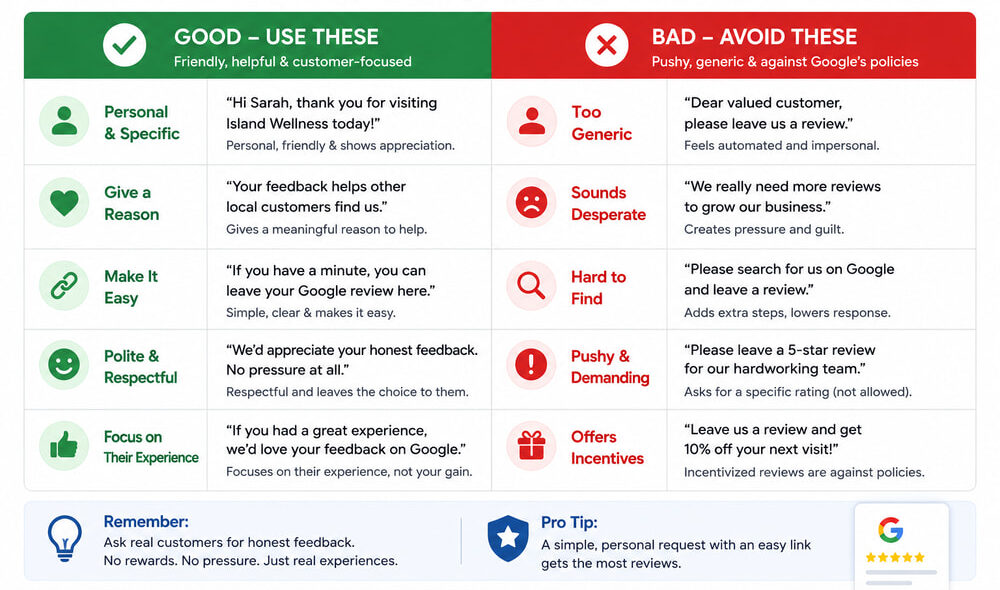
Bad example:
Dear valued customer, please review our business.
Better example:
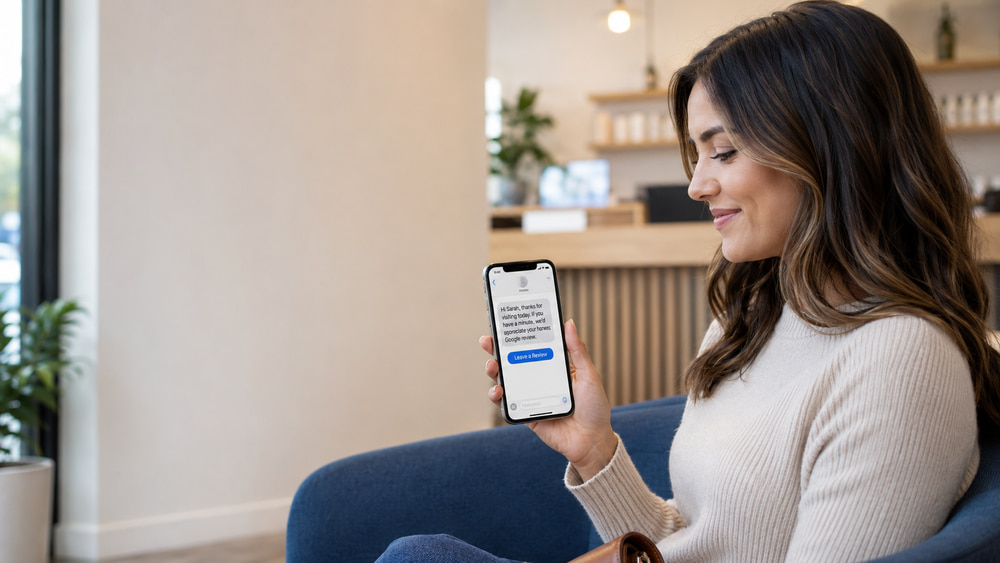
Hi Sarah, thanks for visiting Island Wellness today. We’re glad we could help. If you have a minute, would you mind sharing your experience on Google? It helps other local customers find us.
That version feels more personal because it sounds like it came from a real business, not a bulk campaign.
How Often Should You Ask for Reviews?
Ask once after a real customer experience. If they do not respond, one follow-up is enough.
Do not send multiple reminders. That creates pressure and can damage the customer relationship.
A simple review sequence can look like this:
- Customer completes visit or service.
- Review request is sent after the right delay.
- If no review is left, one reminder is sent after 2 to 4 days.
- Stop.
That is enough.
If your business has regular repeat customers, avoid asking the same person too often. A customer who visits weekly does not need a review request every week.
How to Create Your Google Review Link
You should not ask customers to search your business manually. Send them directly to the review page.
The easier the process, the better.
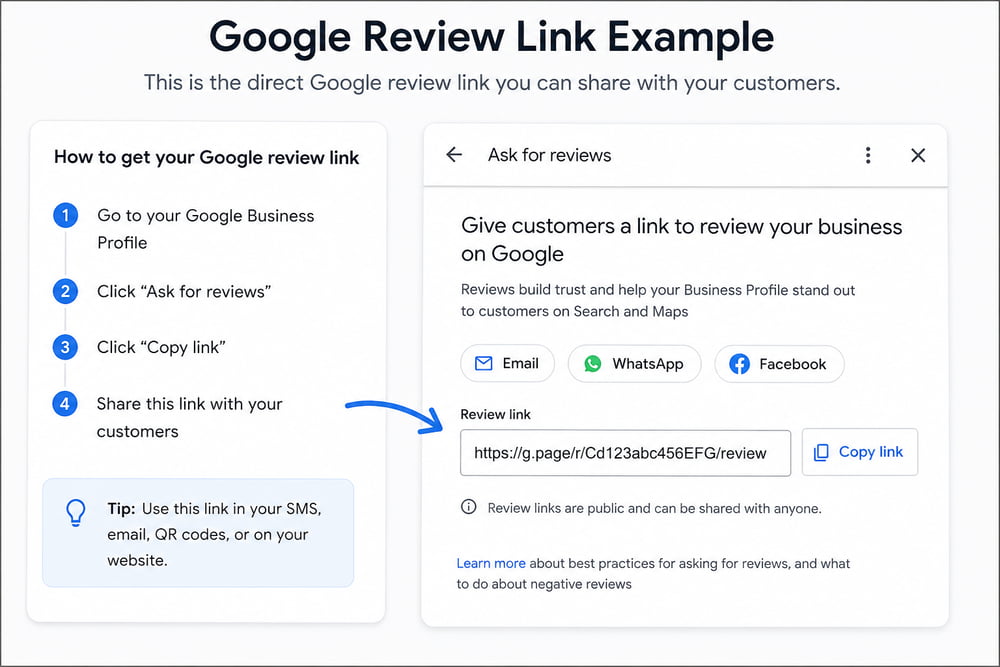
To create your Google review link:
- Open your Google Business Profile.
- Go to “Ask for reviews” or “Share review form.”
- Copy the review link.
- Use that link in your SMS, email, QR code, or website.
Test the link before sending it to customers. Make sure it opens correctly on mobile.
Where to Ask for Google Reviews
You can ask for Google reviews in several places:
| Channel | Best Use |
|---|---|
| SMS | Best for fast post-visit requests |
| Best for formal follow-up | |
| QR code | Good for front desk or receipt |
| Invoice | Good for contractors and service businesses |
| Website | Good for general visitors |
| In person | Good after a positive moment |
| Business card | Good for local networking |
The best system combines two things: a human moment and an easy digital link.
For example, staff can say:
We really appreciate you coming in today. I’ll send you a quick link in case you’d like to share your experience.
Then the automated SMS sends the review link later.
This avoids awkwardness. The staff member does not need to push. The system handles the follow-up.
How to Ask Without Sounding Desperate
The tone matters.
Do not make the customer feel responsible for your success. Do not say:
We really need reviews.
Say:
Your feedback helps other local customers choose us with confidence.
That is stronger because it gives the customer a meaningful reason.
Here are better phrases:
- “Your feedback helps other local customers.”
- “It only takes a minute.”
- “We’d appreciate your honest feedback.”
- “Thanks again for choosing us.”
- “No pressure, but it means a lot to our small business.”
Avoid phrases like:
- “Please help us grow.”
- “We need more reviews.”
- “Please give us 5 stars.”
- “Our staff depends on reviews.”
- “Can you mention this keyword?”
Keep it clean.
How to Handle Negative Reviews
Asking for reviews means you may get some negative feedback. That is normal.
Do not panic. A negative review can still help your business if you respond professionally.
A good response should:
- Thank the customer.
- Acknowledge the issue.
- Avoid arguing.
- Move the conversation offline.
- Show future customers that you care.
Example:
Hi [Name], thank you for your feedback. We’re sorry your experience did not meet expectations. Please contact us at [phone/email] so we can look into this and make it right.
Do not attack the customer. Do not reveal private details. Do not write a defensive essay.
Future customers are not only reading the complaint. They are reading how you respond.
How to Automate Google Review Requests
Manual review asking does not scale.
If your staff has to remember every customer, every visit, every link, and every follow-up, the system will break.
A simple automated review system can:
- Send review requests after each visit.
- Personalize the message.
- Include the direct Google review link.
- Send one follow-up.
- Track who received the request.
- Help the business collect reviews consistently.
Learn how Review Buddy automates Google review requests for local businesses.
See Review Buddy pricing if you want a done-for-you review system.
Automation does not mean the message has to feel robotic. The best systems combine automation with personalization.
The best review automation feels like a thoughtful follow-up, not a mass marketing blast.
Google Review Request Examples by Industry
For a Physiotherapy Clinic
Hi [Customer Name], thank you for visiting [Clinic Name] today. Your feedback helps other patients choose care with confidence. If you have a minute, we’d appreciate your honest Google review.
[Google Review Link]
For a Spa
Hi [Customer Name], thank you for visiting [Spa Name]. We hope you enjoyed your service today. If you’d like to share your experience, you can leave us a Google review here:
[Google Review Link]
For a Pizza Restaurant
Hi [Customer Name], thanks for ordering from [Restaurant Name]. We hope you enjoyed your meal. If you have a minute, we’d love your honest feedback on Google.
[Google Review Link]
For a Contractor
Hi [Customer Name], thank you for trusting [Business Name] with your project. If you’re happy with the work, we’d appreciate your honest Google review.
[Google Review Link]
For a Fitness Studio
Hi [Customer Name], great having you in class today. If you enjoyed your experience, would you mind sharing your feedback on Google? It helps others find our studio.
[Google Review Link]
Common Mistakes to Avoid
Mistake 1: Waiting Too Long
If you wait too long, the customer forgets the emotional part of the experience.
Ask while the experience is still fresh.
Mistake 2: Making the Customer Search for You
Never say:
Find us on Google and leave a review.
Send the direct link.
Mistake 3: Asking Only Happy Customers
This can become review gating. Ask customers fairly and consistently.
Mistake 4: Offering Incentives
Do not offer rewards for reviews. Incentivized reviews can violate platform rules and damage trust.
Mistake 5: Using Robotic Language
Generic review requests get ignored. Make the message sound like a real thank-you.
Mistake 6: Forgetting to Respond
Review generation is only half the job. Responding to reviews shows customers that your business is active and attentive.
FAQ: How to Ask Customers for Google Reviews
Can I ask customers for Google reviews?
Yes. You can ask real customers for honest Google reviews after a real experience. Do not buy reviews, offer incentives, or pressure customers to leave only positive feedback.
What is the best way to ask for a Google review?
The best way is to send a short, personal message with a direct Google review link shortly after the customer’s experience.
Can I offer a discount for a Google review?
No. Offering discounts, gifts, or rewards in exchange for reviews can create policy and trust problems. Ask for honest feedback without incentives.
Should I ask for a 5-star review?
No. Ask for an honest review. Asking specifically for 5 stars can look manipulative.
How soon should I ask for a review?
For most local businesses, ask within a few hours after the visit or service. For longer projects, ask after the work is complete and the customer is satisfied.
Should I follow up if the customer does not leave a review?
Yes, but only once. A polite reminder after a few days is fine. Repeated reminders can feel pushy.
Is SMS better than email for review requests?
For many local businesses, SMS works better because it is short, fast, and easy to tap on mobile. Email can still work for formal or longer customer journeys.
Final Thoughts
Asking customers for Google reviews should not feel awkward. The problem is not the ask. The problem is usually the timing, wording, and lack of a system.
Ask real customers. Ask at the right moment. Make the message personal. Send the direct link. Do not offer incentives. Do not pressure people. Follow up once.
That is the cleanest way to collect more Google reviews without sounding pushy.
If your business wants a simple way to send personalized review requests automatically, Review Buddy helps turn happy customer moments into consistent Google reviews.

Review Buddy helps local businesses improve their online reputation, automate customer follow-ups, and generate more Google reviews with simple, personalized review request systems.